Technical Aspects of the CCPP Prebuild
Prebuild Script Function
The CCPP prebuild script ccpp/framework/scripts/ccpp_prebuild.py is the central piece of code that
connects the host model with the CCPP-Physics schemes (see 3.1). This script must be run
before compiling the CCPP-Physics library and the host model cap. This may be done manually or as part
of a host model build-time script. In the case of the SCM, ccpp_prebuild.py must be run manually, as it not
incorporated in that model’s build system. In the case of ufs-weather-model, ccpp_prebuild.py can be run manually
or automatically as a step in the build system.
The CCPP prebuild script automates several tasks based on the information collected from the metadata
on the host model side and from the individual physics schemes (.meta files; see Figure %s):
Compiles a list of variables required to run all schemes in the CCPP-Physics pool.
Compiles a list of variables provided by the host model.
Matches these variables by their
standard_name, checks for missing variables and mismatches of their attributes (e.g., units, rank, type, kind) and processes information on optional variables. Performs automatic unit conversions if a mismatch of units is detected between a scheme and the host model (see Section 5.2 for details).Filters out unused variables for a given suite.
Autogenerates software caps as appropriate:
Populates makefiles with caps. Statements to compile the CCPP API are included as well.
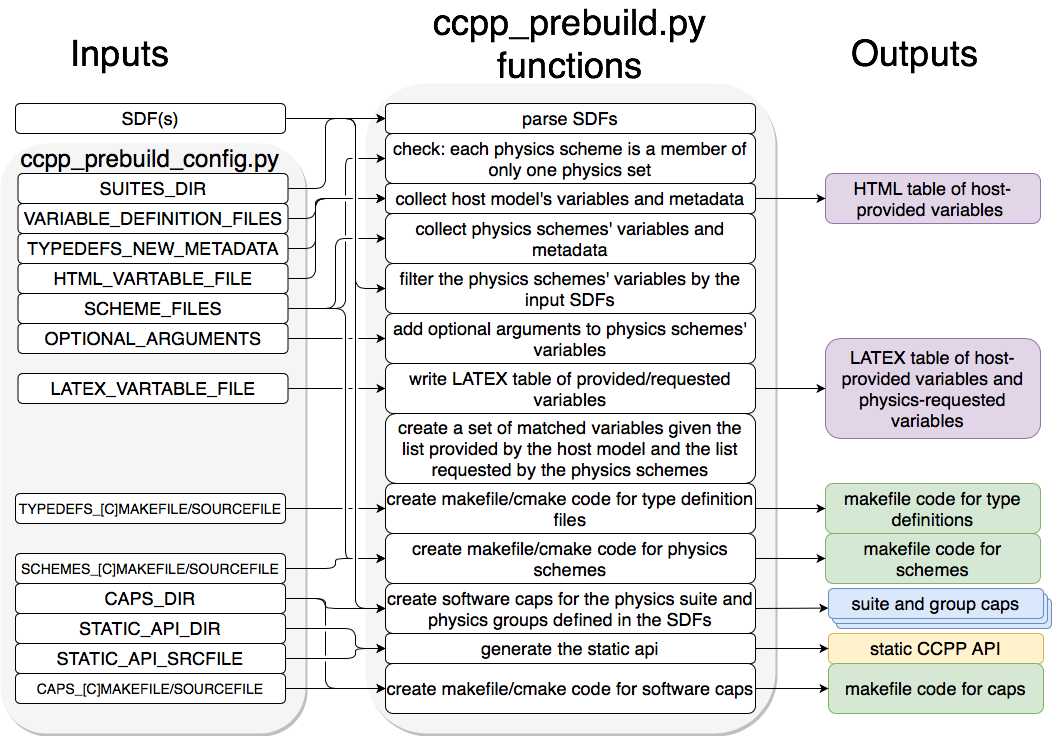
Schematic of tasks automated by the ccpp_prebuild.py script and associated inputs and outputs. The majority of the input is controlled through the host-model dependent ccpp_prebuild_config.py , whose user-editable variables are included as all-caps within the ccpp_prebuild_config.py bubble. Outputs are color-coded according to their utility: purple outputs are informational only (useful for developers, but not necessary to run the code), yellow outputs are used within the host model, blue outputs are connected to the physics, and green outputs are used in the model build.
Script Configuration
To connect the CCPP with a host model XYZ, a Python-based configuration file for this model must be created in the host model’s repository. The easiest way is to copy an existing configuration file for the TEST model in sub-directory schemes/check of the ccpp-Framework repository. The configuration in ccpp_prebuild_config.py depends largely on (a) the directory structure of the host model itself, (b) where the ccpp-framework and the ccpp-physics directories are located relative to the directory structure of the host model, and (c) from which directory the ccpp_prebuild.py script is executed before/during the build process (this is referred to as basedir in ccpp_prebuild_config_XYZ.py).
Listing 8.1 contains an example for the CCPP-SCM prebuild config. Here, it is assumed that both ccpp-framework and ccpp-physics are located in directories ccpp/framework and ccpp/physics of the top-level directory of the host model, and that ccpp_prebuild.py is executed from the same top-level directory.
# Host model identifier
HOST_MODEL_IDENTIFIER = "SCM"
# Add all files with metadata tables on the host model side,
# relative to basedir = top-level directory of host model
VARIABLE_DEFINITION_FILES = [
    ’scm/src/gmtb_scm_type_defs.f90’,
    ’scm/src/gmtb_scm_physical_constants.f90’
    ]
# Add all physics scheme files relative to basedir
SCHEME_FILES = {
# Relative path : [ list of sets in which scheme may be called ]
’ccpp/physics/physics/GFS_DCNV_generic.f90’ ,
’ccpp/physics/physics/sfc_sice.f’
}
# Auto-generated makefile/cmakefile snippets that contain all type definitions
TYPEDEFS_MAKEFILE   = 'ccpp/physics/CCPP_TYPEDEFS.mk'
TYPEDEFS_CMAKEFILE  = 'ccpp/physics/CCPP_TYPEDEFS.cmake'
TYPEDEFS_SOURCEFILE = 'ccpp/physics/CCPP_TYPEDEFS.sh'
# Auto-generated makefile/cmakefile snippets that contains all schemes
SCHEMES_MAKEFILE = ’ccpp/physics/CCPP_SCHEMES.mk’
SCHEMES_CMAKEFILE = ’ccpp/physics/CCPP_SCHEMES.cmake’
SCHEMES_SOURCEFILE = 'ccpp/physics/CCPP_SCHEMES.sh'
# Auto-generated makefile/cmakefile snippets that contains all caps
CAPS_MAKEFILE = ’ccpp/physics/CCPP_CAPS.mk’
CAPS_CMAKEFILE = ’ccpp/physics/CCPP_CAPS.cmake’
CAPS_SOURCEFILE = 'ccpp/physics/CCPP_CAPS.sh'
# Directory where to put all auto-generated physics caps
CAPS_DIR = ’ccpp/physics/physics’
# Directory where the suite definition files are stored
SUITES_DIR = 'ccpp/suites'

# Optional arguments - only required for schemes that use optional arguments.
# ccpp_prebuild.py will throw an exception if it encounters a scheme subroutine with optional arguments if no entry is made here. Possible values are:
OPTIONAL_ARGUMENTS = {
#’subroutine_name_1’ : ’all’, #’subroutine_name_2’ : ’none’, #’subroutine_name_3’ : [ ’var1’, ’var2’],}
# Names of Fortran include files in the host model cap (do not change);
# both files will be written to the directory of each target file
# Directory where to write static API to
STATIC_API_DIR = 'scm/src'
STATIC_API_SRCFILE = 'scm/src/CCPP_STATIC_API.sh'

# Directory for writing HTML pages generated from metadata files
METADATA_HTML_OUTPUT_DIR = 'ccpp/physics/physics/docs'

# HTML document containing the model-defined CCPP variables
HTML_VARTABLE_FILE = ’ccpp/physics/CCPP_VARIABLES.html’
# LaTeX document containing the provided vs requested CCPP variables
LATEX_VARTABLE_FILE = ’ccpp/framework/doc/DevelopersGuide/CCPP_VARIABLES.tex’
Listing 8.1: CCPP prebuild config for SCM (shortened)
Although most of the variables in the ccpp_prebuild_config.py script are described by in-line comments in the code listing above and their use is described in Figure %s, some clarifying comments are in order regarding the SCHEME_FILES variable. This is a list of CCPP-compliant physics scheme entry/exit point source files. For each item in this list, a list of physics “sets” in which the scheme may be executed is included. A physics set refers to a collection of physics schemes that are able to be called together and executed in one software domain of a host model that do not share variables with schemes from another physics set. This feature was included to cater to the needs of the UFS Weather Model, which provides a clear-cut example of this concept. In this model, part of the microphysics scheme needed to be coupled more tightly with the dynamics, so this part of the microphysics code was put into a physics set labeled “fast_physics” which is executed within the dycore code. The variables in this physics set are distinct (in memory, due to a lack of a model variable registry) from variables used in the rest of the physics, which are part of the “slow_physics” set. In the future, it may be necessary to have additional sets, e.g. for chemistry or separate surface model components that do not share data/memory with other model components. For simpler models such as the CCPP SCM, only one physics set (labeled “physics”) is necessary. The concept of physics sets is different from physics “groups”, which are capable of sharing variables among their members and between groups but are used to organize schemes into sequential, callable units.
Running ccpp_prebuild.py
Once the configuration in ccpp_prebuild_config.py is complete, the ccpp_prebuild.py script can be run from the top level directory. For the SCM, this script must be run to reconcile data provided by the SCM with data required by the physics schemes before compilation and to generate physics caps and makefile segments. For the UFS Atmosphere host model, the ccpp_prebuild.py script is called automatically by the ufs-weather-model build system when the CCPP build is requested (by running the CCPP regression tests or by passing the option CCPP=Y and others to the compile.sh script; see the compile commands defined in the CCPP regression test configurations for further details).
For developers adding a CCPP-compliant physics scheme, running ccpp_prebuild.py periodically is recommended to check that the metadata provided with the physics schemes matches what the host model provided. For the UFS Atmosphere, running ccpp_prebuild.py manually is identical to running it for the SCM (since the relative paths to their respective ccpp_prebuild_config.py files are identical), except it may be necessary to add the --suites command-line argument.
As alluded to above, the ccpp_prebuild.py script has five command line options, with the path to a host-model specific configuration file (--config) being the only necessary input option:
-h, --helpshow this help message and exit--configPATH_TO_CONFIG/config_filepath to CCPP prebuild configuration file--cleanremove files created by this script, then exit--debugenable debugging output--suitesSUITES SDF(s) to use (comma-separated, without path)
Note
If the –suites option is omitted, all suites will be compiled into the executable.
An example invocation of running the script (called from the host model’s top level directory) would be:
./ccpp/framework/scripts/ccpp_prebuild.py \
  --config=./ccpp/config/ccpp_prebuild_config.py \
  --suites=FV3_GFS_v15p2 \
  --debug
which uses a configuration script located at the specified path. The debug option can be used for more verbose output from the script.
The SDF(s) must be included and specified using the --suites command-line argument. Such files are included with the SCM and ufs-weather-model repositories, and must be included with the code of any host model to use the CCPP. An example of a build using two SDFs is:
./ccpp/framework/scripts/ccpp_prebuild.py \
  --config=./ccpp/config/ccpp_prebuild_config.py \
  --suites=FV3_GFS_v15p2,FV3_GFS_v16beta
If the CCPP prebuild step is successful, the last output line will be:
INFO: CCPP prebuild step completed successfully.
To remove all files created by ccpp_prebuild.py, for example as part of a host model’s make clean functionality, execute the same command as before, but with --clean appended:
./ccpp/framework/scripts/ccpp_prebuild.py --config=./ccpp/config/ccpp_prebuild_config.py \
--suites=FV3_GFS_v15p2,FV3_GFS_v16beta --clean
Troubleshooting
If invoking the ccpp_prebuild.py script fails, some message other than the success message will be written to the terminal output. Specifically, the terminal output will include informational logging messages generated from the script and any error messages written to the Python logging utility. Some common errors (minus the typical logging output and traceback output) and solutions are described below, with non-bold font used to denote aspects of the message that will differ depending on the problem encountered. This is not an exhaustive list of possible errors, however. For example, in this version of the code, there is no cross-checking that the metadata information provided corresponds to the actual Fortran code, so even though ccpp_prebuild.py may complete successfully, there may be related compilation errors later in the build process. For further help with an undescribed error, please contact gmtb-help@ucar.edu.
ERROR: Configuration fileerroneous/path/to/config/filenot found
Check that the path entered for the
--configcommand line option points to a readable configuration file.
KeyError: ‘erroneous_scheme_name’ when using the--suitesoption
This error indicates that a scheme within the supplied SDFs does not match any scheme names found in the SCHEME_FILES variable of the supplied configuration file that lists scheme source files. Double check that the scheme’s source file is included in the SCHEME_FILES list and that the scheme name that causes the error is spelled correctly in the supplied SDFs and matches what is in the source file (minus any
*_init,*_run,*_finalizesuffixes).
CRITICAL: Suite definition fileerroneous/path/to/SDF.xmlnot found.
Exception: Parsing suite definition fileerroneous/path/to/SDF.xmlfailed.
Check that the path
SUITES_DIRin the CCPP prebuild config and the names entered for the--suitescommand line option are correct.
ERROR: Scheme filepath/to/offending/scheme/source/filebelongs to multiple physics sets: set1, set2
Exception: Call to check_unique_pset_per_scheme failed.
This error indicates that a scheme defined in the
SCHEME_FILESvariable of the supplied configuration file belongs to more than one set. Currently, a scheme can only belong to one physics set.
ERROR: Groupgroup1contains schemes that belong to multiple physics sets: set1,set2
Exception: Call to check_unique_pset_per_group failed.
This error indicates that one of the groups defined in the supplied SDF(s) contains schemes that belong to more than one physics set. Make sure that the group is defined correctly in the SDF(s) and that the schemes within the group belong to the same physics set (only one set per scheme is allowed at this time).
INFO: Parsing metadata tables for variables provided by host model…
IOError: [Errno 2] No such file or directory: ‘erroneous_file.f90’
Check that the paths specified in the
VARIABLE_DEFINITION_FILESof the supplied configuration file are valid and contain CCPP-compliant host model snippets for insertion of metadata information. (see example)
Exception: Error parsing variable entry“erroneous variable metadata table entry data”in argument tablevariable_metadata_table_name
Check that the formatting of the metadata entry described in the error message is OK.
Exception: New entry for variablevar_namein argument tablevariable_metadata_table_nameis incompatible with existing entry:Existing: Contents of <mkcap.Var object at 0x10299a290> (* = mandatory for compatibility):standard_name= var_name *long_name=units= various *local_name=type= real *rank= (:,:,:) *kind= kind_phys *intent= noneoptional= Ftarget= Nonecontainer= MODULE_X TYPE_Yvs. new: Contents of <mkcap.Var object at 0x10299a310> (* = mandatory for compatibility):standard_name= var_name *long_name=units= frac *local_name=type= real *rank= (:,:) *kind= kind_phys *intent= noneoptional= Ftarget= Nonecontainer= MODULE_X TYPE_Y
This error is associated with a variable that is defined more than once (with the same standard name) on the host model side. Information on the offending variables is provided so that one can provide different standard names to the different variables.
Exception: Scheme name differs from module name:module_name= “X” vs.scheme_name= “Y”
Make sure that each scheme in the errored module begins with the module name and ends in either
*_init,*_run, or*_finalize.
Exception: Encountered closing statement "end" without descriptor (subroutine, module, ...): line X= "end " in fileerroneous_file.F90
This script expects that subroutines and modules end with descriptor and name, e.g. ‘end subroutine subroutine_name’.
Exception: New entry for variablevar_namein argument table of subroutinescheme_subroutine_nameis incompatible with existing entry:existing: Contents of <mkcap.Var object at 0x10299a290> (* = mandatory for compatibility):standard_name= var_name *long_name=units= various *local_name=type= real *rank= (:,:,:) *kind= kind_phys *intent= noneoptional= Ftarget= Nonecontainer= MODULE_X TYPE_Yvs. new: Contents of <mkcap.Var object at 0x10299a310> (* = mandatory for compatibility):standard_name= var_name *long_name=units= frac *local_name=type= real *rank= (:,:) *kind= kind_phys *intent= noneoptional= Ftarget= Nonecontainer= MODULE_X TYPE_Y
This error is associated with physics scheme variable metadata entries that have the same standard name with different mandatory properties (either units, type, rank, or kind currently – those attributes denoted with a
*). This error is distinguished from the error described in 8 above, because the error message mentions “in argument table of subroutine” instead of just “in argument table”.
ERROR: Check that all subroutines in modulemodule_namehave the same root name:
i.e. scheme_A_init, scheme_A_run, scheme_A_finalizeHere is a list of the subroutine names for schemescheme_name: scheme_name_finalize, scheme_name_run * All schemes must have*_init,*_run,*_finalizesubroutines contained within its entry/exit point module.
ERROR: VariableXrequested by MODULE_YSCHEME_ZSUBROUTINE_Anot provided by the model
Exception: Call to compare_metadata failed.
A variable requested by one or more physics schemes is not being provided by the host model. If the variable exists in the host model but is not being made available for the CCPP, an entry must be added to one of the host model variable metadata sections.
ERROR: error, variableXrequested by MODULE_YSCHEME_ZSUBROUTINE_Acannot be identified unambiguously. Multiple definitions in MODULE_YTYPE_B
A variable is defined in the host model variable metadata more than once (with the same standard name). Remove the offending entry or provide a different standard name for one of the duplicates.
ERROR: incompatible entries in metadata for variablevar_name:provided: Contents of <mkcap.Var object at 0x104883210> (* = mandatory for compatibility):standard_name= var_name *long_name=units= K *local_name=type= real *rank= *kind= kind_phys *intent= noneoptional= Ftarget= Nonecontainer=requested: Contents of <mkcap.Var object at 0x10488ca90> (* = mandatory for compatibility):standard_name= var_name *long_name=units= none *local_name=type= real *rank= *kind= kind_phys *intent= inoptional= Ftarget= Nonecontainer=
Exception: Call to compare_metadata failed.
This error indicates a mismatch between the attributes of a variable provided by the host model and what is requested by the physics. Specifically, the units, type, rank, or kind don’t match for a given variable standard name. Double-check that the attributes for the provided and requested mismatched variable are accurate. If after checking the attributes are indeed mismatched, reconcile as appropriate (by adopting the correct variable attributes either on the host or physics side).
Note: One error that the ccpp_prebuild.py script will not catch is if a physics scheme lists a variable in its actual (Fortran) argument list without a corresponding entry in the subroutine’s variable metadata. This will lead to a compilation error when the autogenerated scheme cap is compiled:
Error: Missing actual argument for argument 'X' at (1)